what does this error message mean on my desktop computer and can anyone help fix it
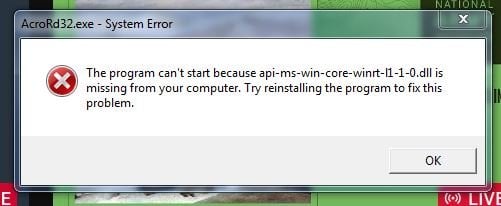
its a message which has appeared in the last couple of days on my windows computer, and i don't know how to go about fixing it, i'm no tech expert by any stretch......and the message always appears when i turn my computer on in the morning, launch google chrome and go to the youtube website, i then see this error message on the screen, here;
i'm praying me posting a snapshot of the error message helps and someone can perhaps research it and help, to go about fixing it....id appreciate any assistance.
also my computer seems to be running ok apart from that pop up error message, youtube videos running ok, websites responding ok etc.
This page is a permanent link to the reply below and its nested replies. See all post replies »
I would first run anti-virus software if you have it installed. You could Google "Can't start because api-ms-win-core-winrt-I1-1-0.dll is missing" into Search and see what comes back. Might be an easy fix. That error looks like it being thrown by Acrobat Reader because it cannot find a specific chunk of software called a run-time dynamic-link library (.dll). Alternatively, you could try uninstalling Acrobat Reader then re-installing it if you use it. That might force an installation of that missing .dll file.
@rfatodaythanks for answering, yes i have malwarebytes premium, so i'm running that now, i was thinking the same thing about reinstalling Acrobat reader, as i did have a cursory search on google and saw it was something to do with Acrobat. thanks once more.